- Adventure
- Adventure Time
- Apple and Onion
- Batwheels
- Ben 10
- Bugs Bunny
- Craig Of The Creek
- Fighting
- Grizzy & the Lemmings
- Gumball
- Jellystone
- Looney Tunes
- Mickey Mouse
- Mr Bean
- PAW Patrol
- Peppa Pig
- Puzzle
- Racing
- Regular Show
- Run
- Scooby-Doo
- SpongeBob SquarePants
- Sports
- Teen Titans Go
- Teenage Mutant Ninja Turtles
- Tom and Jerry
- Unikitty
- All Categories
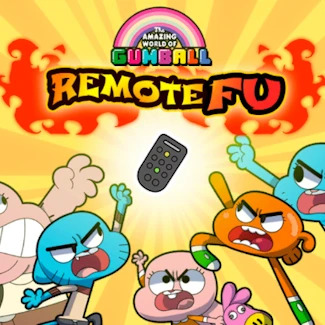
Gumball: Remote Fu
How to Play Gumball: Remote Fu
Use your keyboard to control Gumball in intense kung fu street battles. Move, jump, punch, and kick your way through enemies to capture the remote control.
Controls
- Arrow keys: Move left, right and jump
- C key: Kick
- X key: Punch
Play Gumball: Remote Fu: Battle and Chase Online
Jump into the chaotic street fights of Gumball: Remote Fu where you control Gumball in a high-energy kung fu showdown. Race through levels, punch and kick rival characters, and defeat them to unlock new fighters. Your ultimate goal is to reach Anais and win the boss battle to claim the coveted remote control. This HTML5 browser game runs instantly on desktop, tablet, or mobile—no download needed!
Gumball: Remote Fu Gameplay and Features
Use arrow keys to move and jump, and the C and X keys to unleash kicks and punches in fast-paced combat. Deplete the health bars of enemies while avoiding their attacks to progress through challenging street battles. Defeating all opponents unlocks characters and advances you to the final boss fight against Anais, who holds the remote you must capture.
- Dynamic kung fu combat with simple keyboard controls
- Multiple characters to unlock by winning fights
- Progressive levels culminating in an intense boss battle
- Instant play on any browser with full HTML5 support
- Compatible with desktop, tablets, and mobile devices
- No downloads or installations required for fast access
Tips and Strategies for Gumball: Remote Fu
Master timing your punches and kicks to break through enemy defenses without losing health. Use movement keys to dodge attacks and position yourself advantageously during fights. Focus on defeating each rival quickly to conserve health for the boss battle. Unlocking all characters gives you varied fighting styles to adapt to different opponents.
- Practice combos using C and X for maximum damage
- Keep moving to avoid getting cornered by enemies
- Target weaker foes first to reduce the number of attackers
- Learn boss patterns to strike during openings
FAQ
Is Gumball: Remote Fu free to play?
Yes, you can play Gumball: Remote Fu free online with no cost or downloads required.
Can I play Gumball: Remote Fu on mobile or tablet?
Absolutely, Gumball: Remote Fu supports desktop, tablet, and mobile browsers for seamless gameplay.
Do I need an account to play Gumball: Remote Fu?
No account or login is needed; just open your browser and start playing instantly.
Is this the original version of Gumball: Remote Fu?
Yes, this is the authentic HTML5 version of Gumball: Remote Fu designed for browser play.